고정 헤더 영역
상세 컨텐츠
본문
728x90
반응형
import 'package:flutter/material.dart';
import 'package:login/seens/login_page.dart';


void main() {
  runApp(const MyApp());
}

class MyApp extends StatelessWidget {
  const MyApp({super.key});

  // This widget is the root of your application.
  @override
  Widget build(BuildContext context) {
    return MaterialApp(
      debugShowCheckedModeBanner: false,
      title: 'Flutter Demo',
      theme: ThemeData(
        primarySwatch: Colors.blue,
      ),
      home:  const LoginPage(),

    );
  }
}
Login Page 생성
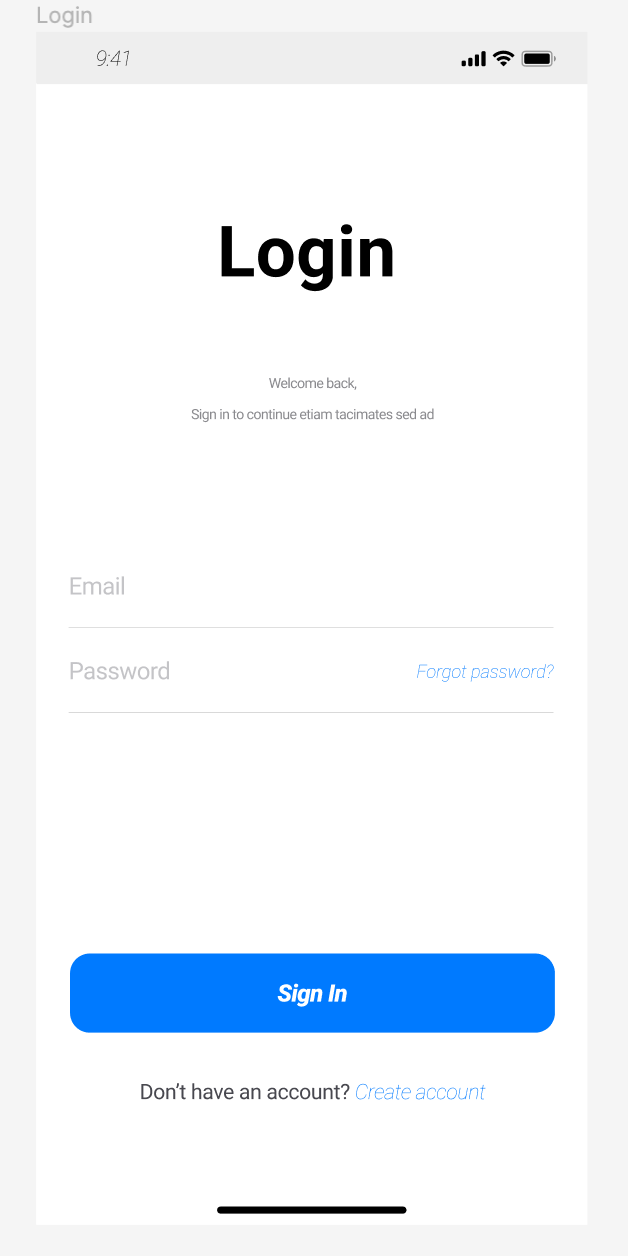
로그인 페이지 생성을 위한 코드
- Login Text 중앙 생성
- Login Text 하단 작은 글씨 생성
- ID , PW 입력 박스
- Sing in 버튼
- Don't haver an account? Create account Text button 생성
import 'package:flutter/material.dart';
import 'package:login/seens/find_information.dart';
import 'package:login/seens/my_profile_page.dart';

class LoginPage extends StatefulWidget {
  const LoginPage({Key? key}) : super(key: key);

  @override
  State<LoginPage> createState() => _LoginPageState();
}

class _LoginPageState extends State<LoginPage> {
  final myController = TextEditingController();

  @override
  Widget build(BuildContext context) {
    return Scaffold(
      body: Container(
        color: Colors.white,
        child: ListView(
          children: <Widget>[
            Column(
                mainAxisAlignment: MainAxisAlignment.center,
                children: <Widget>[
                  Container(
                    color: Colors.white,
                    padding: const EdgeInsetsDirectional.only(top: 100),
                    child: const Text(
                      'Login',
                      textAlign: TextAlign.center,
                      style: TextStyle(
                          color: Colors.black,
                          fontFamily: 'Roboto',
                          fontSize: 50,
                          letterSpacing: 0.37400001287460327,
                          fontWeight: FontWeight.bold,
                          decoration: TextDecoration.none,
                          height: 0.82),
                    ),
                  ),
                ]),
            const SizedBox(
              height: 80,
            ),
            const Center(
                child: Padding(
              padding: EdgeInsets.all(8.0),
              child: Text(
                'Welcome back,',
                style: TextStyle(
                    color: Colors.grey,
                    fontFamily: 'Roboto',
                    fontSize: 13,
                    letterSpacing: 0.37400001287460327,
                    fontWeight: FontWeight.bold,
                    decoration: TextDecoration.none,
                    height: 0.82),
              ),
            )),
            const SizedBox(
              height: 20,
            ),
            const Center(
              child: Text(
                'Sign in to continue etiam tacimates sed ad',
                style: TextStyle(
                    color: Colors.grey,
                    fontFamily: 'Roboto',
                    fontSize: 13,
                    letterSpacing: 0.37400001287460327,
                    fontWeight: FontWeight.bold,
                    decoration: TextDecoration.none,
                    height: 0.82),
              ),
            ),
            const Padding(
              padding: EdgeInsets.only(top: 80, right: 10, left: 10),
              child: TextField(
                decoration: InputDecoration(
                  border: OutlineInputBorder(),
                  labelText: 'ID',
                ),
              ),
            ),
            const Padding(
              padding: EdgeInsets.only(top: 20, right: 10, left: 10),
              child: TextField(
                decoration: InputDecoration(
                  border: OutlineInputBorder(),
                  labelText: 'PW',
                ),
              ),
            ),
            Padding(
              padding: const EdgeInsets.only(top: 50, right: 30, left: 30),
              child: SizedBox(
                  width: 150,
                  height: 60,
                  child: ElevatedButton(
                    onPressed: () {
                      Navigator.push(
                          context,
                          MaterialPageRoute(
                              builder: (context) => const MyProfilePage()));
                    },
                    style: ElevatedButton.styleFrom(
                        backgroundColor: Colors.blue,
                        shape: RoundedRectangleBorder(
                            borderRadius: BorderRadius.circular(15))),
                    child: const Text(
                      'Sign In',
                      style: TextStyle(fontSize: 18),
                    ),
                  )),
            ),
            Padding(
              padding: const EdgeInsets.only(top: 20, right: 30, left: 30),
              child: TextButton(
                onPressed: () {
                  Navigator.push(
                      context,
                      MaterialPageRoute(
                          builder: (context) => const FindInformation()));
                },
                child: const Text(
                  'Don’t have an account? Create account',
                  style: TextStyle(fontSize: 13),
                ),
              ),
            ),

          ],
        ),
      ),
    );
  }
}

728x90
반응형
'앱 < Flutter > > Flutter Widgets' 카테고리의 다른 글
| Flutter Coding Study_2 (App bar) (0) | 2023.03.10 |
|---|


